Last updated: 2026-1-05
NUCLEUS
NUCLEUS is a ‘homebrew’ environment monitoring system. GitHub
Prologue
In early 2020 I lived with a flatmate and we would regularly quarrel about the heating (it was expensive to run) and the temperature of the flat. I was furloughed from my job for a month due to the COVID-19 pandemic and used the time to implement a system that could monitor and graph environmental data in the flat. Over five years later and a few iterations later I have continued to develop it for use in my dwellings.
Overview
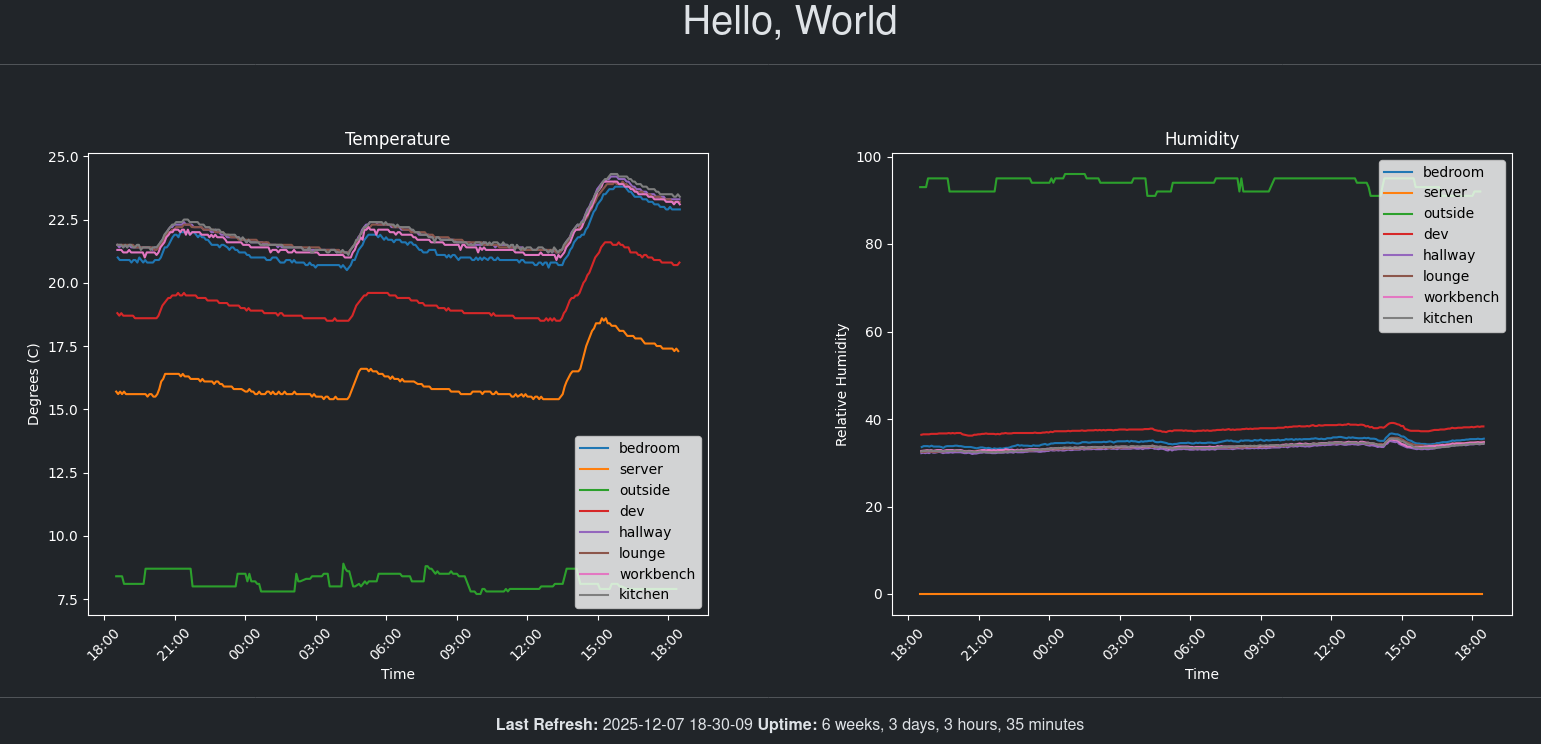
NUCLEUS homepage displaying 24-hour environment data from sensor nodes
The NUCLEUS system consists of a central server which receives environment data from nodes that are placed around my flat. The server also hosts a website that displays the recorded data. The following diagram summarises the topology of the setup:
Flowchart overview of the NUCLEUS system
The system utilises the MQTT protocol1 for data communications between nodes and the server. The implementation allows the server to generically subscribe to topics so that nodes can be arbitrarily added without any further modification to code or settings.
Components
Server
The server consists of a Raspberry Pi 2 Model B (Rev 1.1) which is connected to an MCP9808 temperature sensor 2. The server has the following services running:
| Service | Description |
|---|---|
| Nginx | Hosting web service |
| uWSGI | Hosting web service |
| Mosquitto | MQTT Broker |
| home-daemon | Custom service that reads and transmits temperature data to the MQTT broker |
The web service is a custom Flask3 application that handles the reading and writing of environment/event data to a SQLite database which is then displayed on the webpage. The webpage uses matplotlib4 for generating the graphs.
Node
The node measures and transmits environmental data to the broker as well as events (accelerometer vibration detected, custom GPIO inputs). The nodes are all time synchronised using Network Time Protocol5 (NTP) so that transmitted data can be encapsulated with a timestamp.
The nodes utilise the RP2040 Pico W boards available from the Raspberry Pi foundation. These are accompanied by a custom circuit board I designed that contains a variety of sensors and functionality. The Pico W boards have an on-board WiFi module enabling all TCP/IP6 data transmissions to be wireless.
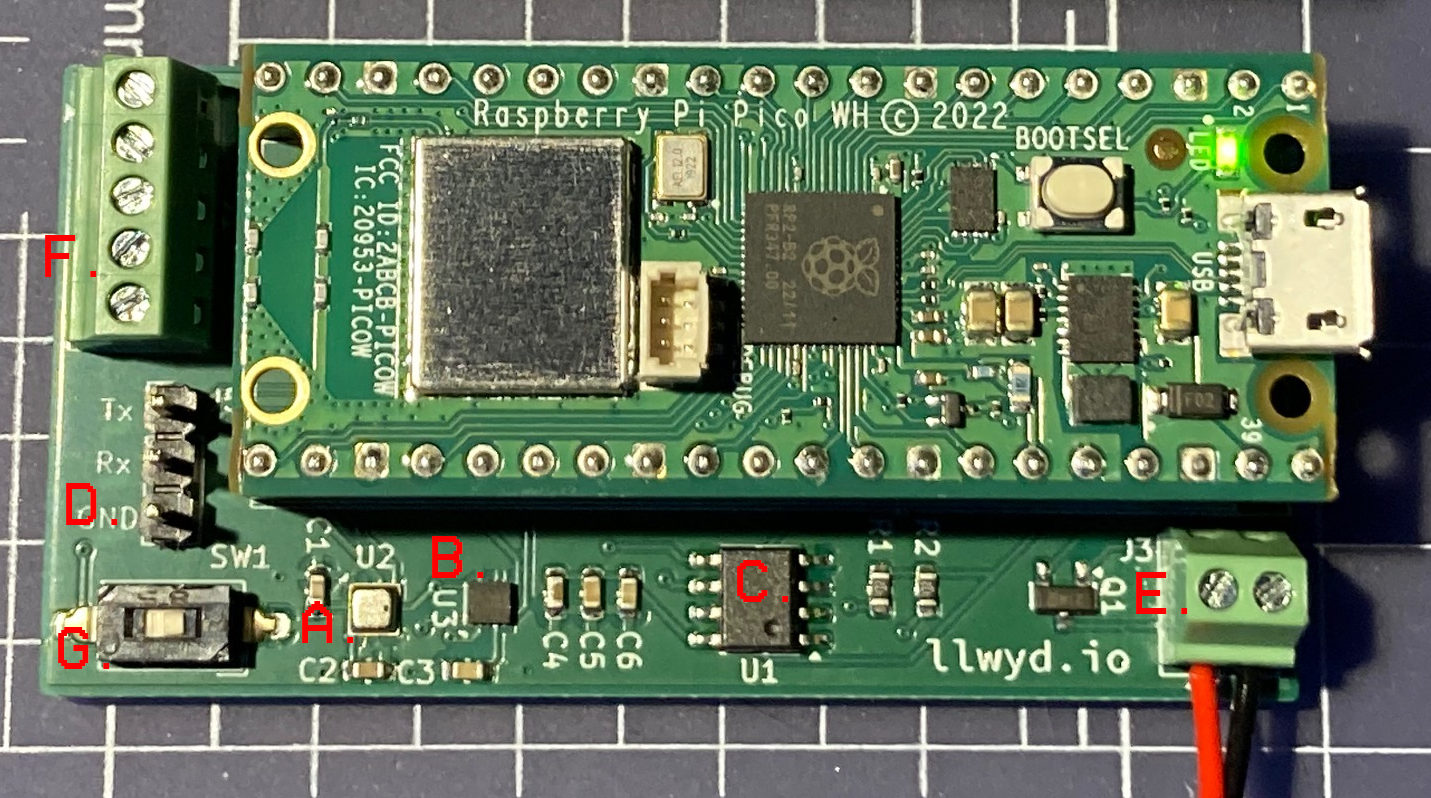
NUCLEUS Node with latest revision (1.2) of the circuit board
The various parts of the Node circuit board are summarised in the following table:
| Label | Component | Description |
|---|---|---|
| A. | BME280 | Environment sensor used for measuring temperature and humidity. |
| B. | MMA8653 | Accelerometer used for detecting vibration activity. The two interrupt lines are used as inputs to the RP2040, which triggers an interrupt when a vibration is detected. |
| C. | 24LC04 | 4kB EEPROM used for storing node specific data such as WiFi details, name etc |
| D. | UART | These pins (Tx,Rx and GND) have been broken out to 2.54mm headers so that an external cable can be used to read and write serial data. This is useful for debugging the firmware and configuring EEPROM data. |
| E. | 5V power | A screw terminal allows external 5v powering of the node instead of the Pico W’s onboard USB. The board utilises the data-sheet’s recommendation7 for a P-MOSFET so that the onboard USB and external supply can be connected simultaneously. |
| F. | Custom GPIO input | An additional screw terminal allows custom 3.3v inputs to be connected to the node. When the input transitions from high to low it will automatically trigger an event to be transmitted to the broker along with a timestamp of when the event occurred. The terminal block also provides access to GND and 3.3v references. |
| G. | Switch | Input switch so that the Node can be set into config mode, allowing the user to write parameters to the EEPROM |
Firmware
The firmware utilises a monolithic hierarchical state machine (HSM) which is summarised in the diagram below:
Summary of Hierarchical state machine for a NUCLEUS node
The node will re-execute the relevant setup stage upon disconnection or error of a particular connection or peripheral. The parent states are summarised in the following table:
| State | Description |
|---|---|
| SetupWifi | Configuring and establishing a connection to the network via WiFi |
| ConfigureRTC | Retrieve a timestamp from an NTP server and use it to program the RP2040’s real time clock |
| Setup | Connect to the MQTT broker and subscribe to the necessary topics |
| Root | Main operation loop of the node upon successful setup of the necessary peripherals and connections. Periodically reads environmental data and handles interrupt driven events from peripherals. |
Articles
I’ve written various articles about specific areas relating to the NUCLEUS project:
- Debugging a faulty Node PCB link
- Testing the first iteration of the Node PCB link
- Testing the second iteration of the Node PCB link
- Cleaning noisy sensor data link